War - Chess-like Strategy Game for Playdate
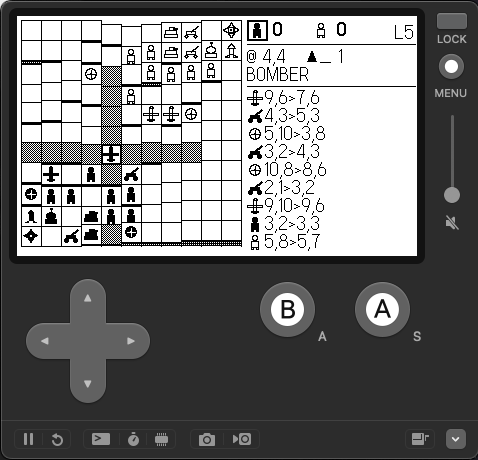
My custom chess-like strategy board game, War, ported to the Playdate handheld. Written in C using the Playdate C API.
This is the third version of War. It started as a physical board game, then became a Kotlin + LibGDX desktop game with MiniMax AI, and now runs on Playdate's tiny 1-bit screen with a crank.
Available on itch.io.
The source code can be found on GitHub.
The Game
War is a deterministic, two-player strategy game on an 11x11 board. No dice, no luck. Capture the enemy Commander or wipe out all their attack pieces to win.
Tiles have elevation (0-4). Pieces can only climb or descend one level per step, so terrain creates natural chokepoints, defensive walls, and flanking routes. Some pieces like Bombers, Missiles, and Artillery ignore terrain entirely.
The board is symmetric so neither player gets a starting advantage.
Pieces
Each piece has a unique role. No two pieces move or attack the same way.
| Piece | Move | Attack |
|---|---|---|
| Commander | 1 in any direction | 1 in any direction (game-over) |
| Infantry | 1 horiz/vert | 1 diagonal |
| Tank | 1-2 horiz/vert | 1-2 horiz/vert |
| Sniper | 1-2 diagonal | 1-2 diagonal |
| Artillery | 1 in any direction | 2-3 horiz/vert (then reloads 3 turns) |
| Missile | 1 in any direction | 2-5 diagonal - destroyed after use |
| Air Defense | 1 in any direction | None (passively intercepts adjacent) |
| Bomber | 1-4 horiz/vert | 1-4 horiz/vert, can fly over allies |
Key interactions:
- Artillery: fires over pieces and terrain but needs 3 turns to reload between shots. A reloading indicator shows on the piece.
- Missiles: are powerful diagonal strikers but self-destruct after a single use.
- Air Defense: automatically intercepts adjacent Bombers and Missiles, both die in the process.
- Bombers: fly over friendly pieces and ignore elevation, but are vulnerable to Air Defense.
Controls
| Button | Action |
|---|---|
| D-pad | Move cursor across the 11x11 board |
| A | Select your piece / confirm destination |
| B | Cancel current selection / return to title |
| Crank | Scrub through move history |
| A + Crank | Adjust AI level mid-game |
The crank is one of my favorite parts. Spinning it lets you scrub backwards through the entire move history, you can review past turns, and even branch off from a previous state to try a different line. It's like having undo on a dial.
AI Opponent
The game has a MiniMax AI with alpha-beta pruning. There are 9 difficulty levels:
- Levels 1-3: Depth 1 search, with decreasing randomness (70% -> 40% -> 0% noise)
- Levels 4-6: Depth 2 search, same noise gradient
- Levels 7-9: Depth 3 search, tightening from 40% to 0% noise
The AI evaluates board state using material scores, positional advantage (how close pieces are to the enemy Commander), and a threat penalty for enemies near your own Commander. Move ordering prioritizes attacks by the value of the destroyed piece, which helps alpha-beta pruning cut branches early.
One challenge was fitting this on the Playdate's 60KB stack. The per-ply scratch buffers (~26KB of move arrays per depth) are kept as static globals indexed by recursion ply instead of stack-allocated. The AI search runs one depth per frame with iterative deepening, so the screen redraws between depths and shows an animated hourglass while it thinks.
Title Menu
The title screen lets you configure the game before starting:
- Player vs Player: two humans, pass-and-play
- Player vs AI: play against the MiniMax AI
- AI Level: adjust difficulty L1 through L9
- Map: choose from 5 terrain layouts
- Render: toggle between flat and elevated tile views
Maps
Five terrain layouts to keep games fresh:
- Default: asymmetric peaks and valleys
- Classic: a single centered hill block
- Valley: diagonal ridge with scattered hills
- Waves: smooth procedural sin/cos terrain
- Random: fully randomized elevation each game
Render Modes
Two rendering styles:
- Elevated: tiles rise off the board with shaded south-face walls. You can see the terrain height at a glance. Pieces sit on top of their elevated platforms.
- Flat: all tiles are flat with small dot markers showing elevation level. Cleaner look if you prefer less visual noise.
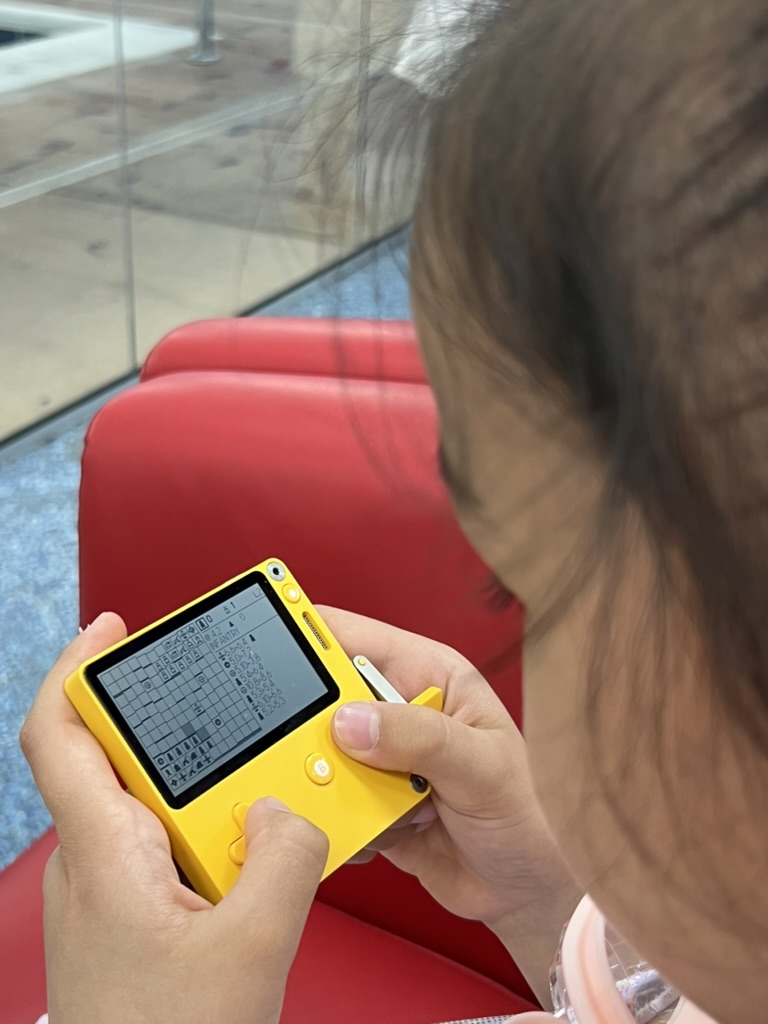
Sidebar
The right sidebar packs a lot of info into a small space:
- Player status: infantry icons for black/white with scores, thick frame around the active player
- Cursor info: current tile coordinates, elevation icon, and the piece name under the cursor
- Move history: scrolling list of recent moves showing piece sprites, coordinates, and destroyed pieces
Hovering over any piece (yours or the enemy's) previews its legal moves, so you can always read threats before committing.
Move History & Branching
The game keeps a ring buffer of board snapshots. Use the crank to scrub back through past turns. Press A on a past state to branch, the future history is discarded and you continue from that point. Press B to snap back to the live game.
This is great for exploring "what if" scenarios and learning from mistakes.
Building from Source
# Set your Playdate SDK path
export PLAYDATE_SDK_PATH=/path/to/PlaydateSDK

# Build and run in simulator
make clean && make && make run
The game logic is split from the Playdate rendering, so you can also run the tests under stock clang:
make test
Architecture
The codebase is clean C with no external dependencies beyond the Playdate SDK:
main.c- Playdate entry point and update loopboard.c- board state, terrain generation, piece placement, win detectionpiece.c- piece types, scoring, namesmove.c- move generation and validation for all piece typesgame.c- game state machine (title, free, selected, AI thinking, game over)ai.c- MiniMax with alpha-beta pruning, move ordering, iterative deepeningrender.c- all drawing: board tiles, piece sprites, sidebar, title menu, game-over bannerinput.c- button and crank input handlinghistory.c- ring buffer for move history and board snapshots
TODO: Currently the pieces are drawn via shapes, I'll be upgrading these to images soon for better quality. :)
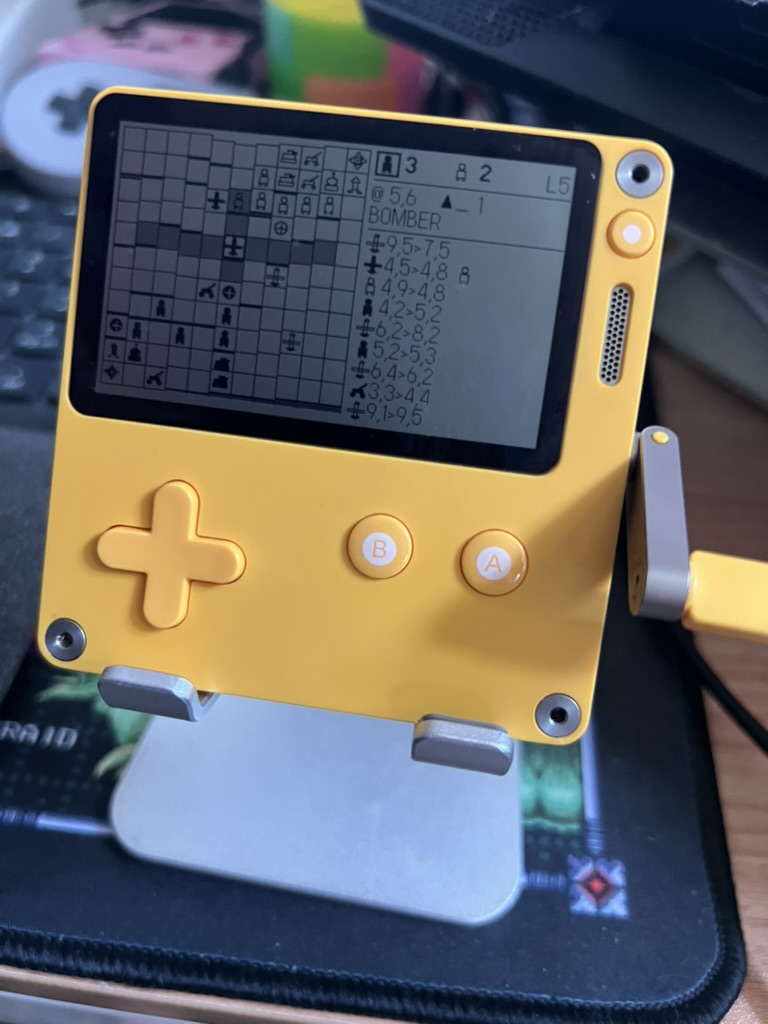
 Arrived
 Ninja Turdle
 Twitch