Nintendo Infinite Techno
A continuously, evolving Nintendo-themed techno generator that creates new music by blending MIDI patterns from video game soundtracks, custom synthesizers built from scratch with numpy DSP, WAV samples, and musical loops.
I started this project with Cursor by asking it to read in SonicPi + synthesizor code from a previous project, alongwith Super Metroid MIDI tracks, and generate a continuous, streaming techno remix. I was happy with the results so just expanded the concepts. The generator also support up/down voting, which further contributes the likilehood of a sound component appearing later on.
Listening to the music is a bit of a rodeo as sometimes there is some really good stuff, and other times it's "meh", or worse. :) Listen at your own risk. There is 100
Search for any of the "Super Metroid Infinite Techno" or "Nintendo Infinite Techno" tracks on Soundcloud: Nintendo Infinite Techno on SoundCloud
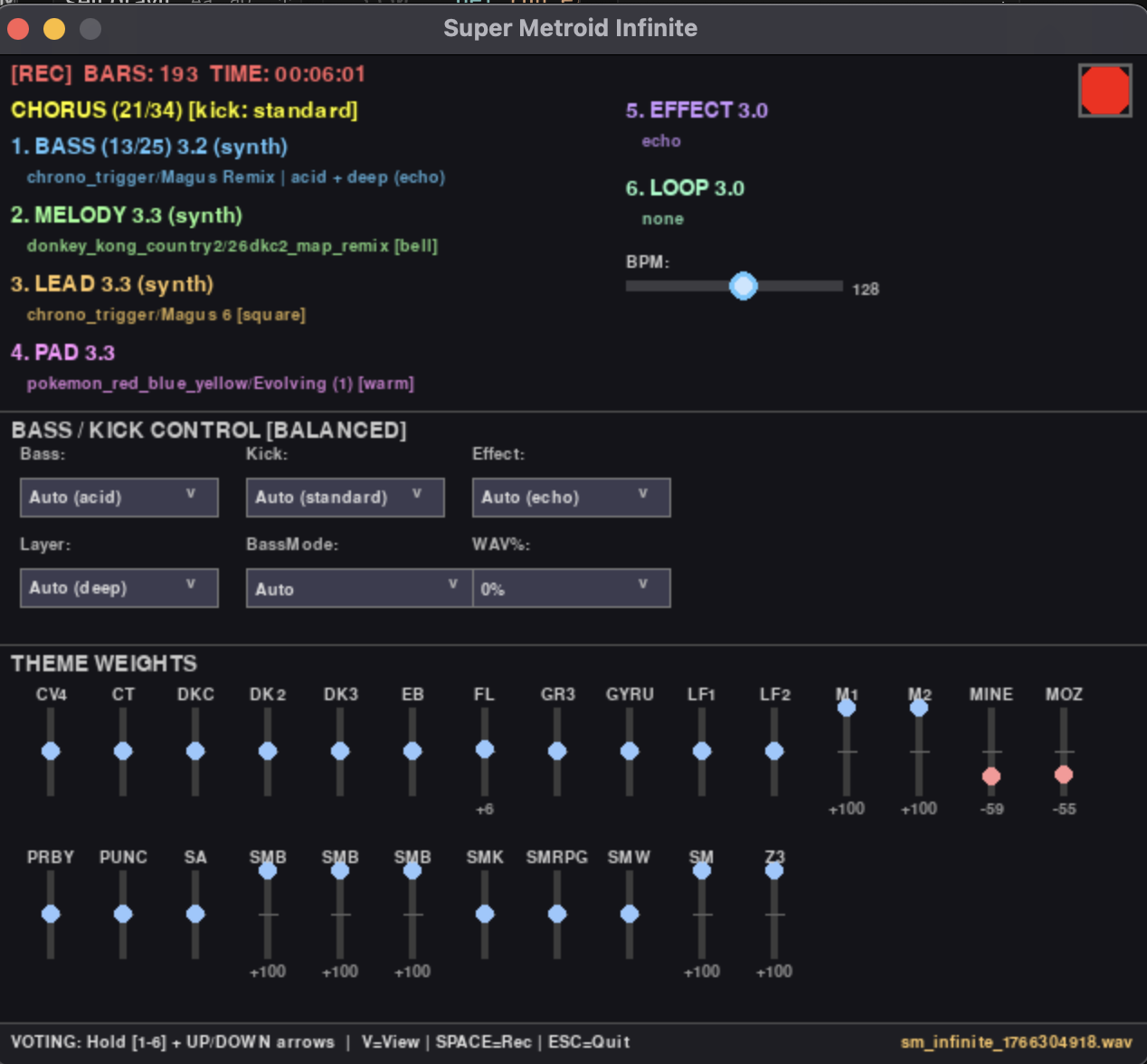
Below is a mostly AI generated description of the project. I plan on open-sourcing the project but currently it has a lot of audio files that need to be removed from git history before publishing.
How It Works
Phase 1: Analysis (Startup)
When you launch, the generator analyzes three sonic layers:
MIDI Pattern Library
- Recursively scans
songs/for all.midfiles - Extracts note patterns from each track (bass, melody, lead, pad)
- Categorizes patterns by their musical role:
- Bass: Low notes (< 65) with steady rhythm → drives the groove
- Melody: Mid-range melodic phrases (65-80) → main hooks
- Lead: High expressive lines (> 80) → chorus energy
- Pad: Sustained chords → atmospheric depth
- Creates a pattern hash for each unique sequence (for rating/deduplication)
- Special handling: FL Studio folder (619 EDM patterns) is randomly sampled (default: 100) to avoid overwhelming game soundtracks
Result: Library of ~1,300 bass patterns, ~3,200 melodies, ~1,000 pads ready to mix!
WAV Sample Library
- Scans
songs/samples/for one-shot samples - Analyzes each file for quality and usability:
- Extracts clean attack/sustain (using onset detection)
- Measures RMS loudness (filters out quiet/noisy samples)
- Normalizes to 16-bit/44100Hz/stereo (prevents audio artifacts)
- Caches metadata for instant loading next time
- Categorizes by filename/path keywords:
kick,bd,drum→ Kick categorysnare,clap→ Snare categorybass,sub→ Bass categoryvocal,vox→ Vocal FX category
- No pitch shifting! Samples play at their natural pitch like a drum machine
Result: ~20 high-quality one-shot samples ready to trigger!
Loop Library
- Scans
songs/samples/loops/for background musical loops - Validates duration (filters out accidental one-shots)
- Normalizes format (16-bit/44100Hz)
- Stores as atmospheric layer that plays 50% of the time (variable volume dynamics)
Result: ~15 loops for evolving background textures!
Phase 2: Generation (Runtime)
The generator creates music in sections (Intro → Verse → Chorus → Breakdown) with intelligent structure:
Pattern Selection Algorithm
For each element (bass, melody, lead, pad), the generator:
- Gathers candidates from the pattern library
- Applies folder weights (you can bias toward specific game soundtracks)
- Applies rating weights (your 1-5 star votes influence selection):
- 1.0★ → 0.1x chance (almost never)
- 3.0★ → 1.0x chance (default)
- 5.0★ → 2.0x chance (20x more likely than 1★!)
- Weighted random selection → picks pattern based on combined score
- Stores full context (bass type, kick flavor, effects, loop state)
Hybrid Sound Engine
Every sound has a probability of being:
- WAV sample (default: 50%) → Authentic drum machine character
- Synthesizer (default: 50%) → Multi-parametered Python Synthesizors
You control the mix:
- Slider in DJ Mixer Mode (0% = all synth, 100% = all samples)
- Command-line:
--ignore-wav(synth only) or--ignore-synth(samples only)
If a sample fails to load, it gracefully falls back to synth (or silence if forced sample-only).
Sonic Variety
The generator constantly evolves:
- 12 bass types: Deep, Acid, Wobble, Gritty, PVC, FM, Hollow, Punchy, Resonant, Sub, Pluck
- 30% bass layering chance (two bass layers for thicc sound)
- 4 kick flavors: Standard, Heavy, Tight, Punchy (changes per section)
- Multiple synth voices: Brass, Saw, Bell, Pluck, Square, Sine (for lead/melody/pad)
- 6 effect types: Reverb, Delay, Distortion, Filter, Chorus, Dry
- Background loops: Play 50% of the time for dynamic volume variation
Section Dynamics
- Intro (12-20 bars): Builds energy
- Verse (16-24 bars): Steady groove
- CHORUS (24-72 bars): RIDES LONGER! Layered leads, big sound, 1.5-3x duration
- Breakdown (8-16 bars): Tension/release
Controls
Keyboard
- SPACE - Toggle recording on/off
- V - Cycle view modes (Chaos → Minimal → DJ Mixer)
- ESC - Quit
- 1-6 + ↑/↓ - Vote on what's playing (see Voting System below)
Mouse
- Click red button - Toggle recording
- Drag sliders (DJ Mixer Mode) - Adjust folder weights and WAV%
- Click dropdowns (DJ Mixer Mode) - Change bass type, kick, effects
Voting System
Shape your perfect mix in real-time! The generator learns your preferences.
How to Vote
Hold a number key (1-6) and press UP ⬆️ or DOWN ⬇️ arrow:
1 = Bass Pattern      (Rate the current bassline)
2 = Melody Pattern    (Rate the melody/hook)
3 = Lead Pattern      (Rate the lead synth)
4 = Pad Pattern       (Rate the pad/harmony)
5 = Effect Settings   (Rate current effect combo)
6 = Background Loop   (Rate the current loop)
What Happens When You Vote
Immediate:
- Visual feedback flashes on screen
- Console shows:
⭐ ▲ BASS: super_metroid/brinstar → 4.2
Future sessions:
- Higher-rated patterns play 20x more often (5★ vs 1★)
- Full context preserved → exact sound recreation possible
DJ Mixer Mode
Press V twice to access the control panel!
Features
-
Folder Weight Sliders (Bottom)
- Bias selection toward specific game soundtracks
- Range: -100 (almost never) → +100 (10x more likely)
- Example: Set Super Metroid to +80, FL Studio to -50 🎮
-
WAV% Slider (Center)
- Control sample vs synth probability
- 0% = All synth, 100% = All samples
- Shows (wav) or (synth) indicators for each element
-
Bass Controls (Left Panel)
- Bass Type: Choose from 12 synth types
- Kick: Select kick flavor
- Effect: Apply bass effects
- Layer: Add bass layering (sub, resonant, deep)
Changes take effect on the next pattern change, not immediately.
View Modes
Press V to cycle through:
-
Chaos Mode - Audio-reactive visualizations (full CPU)
- Fractal patterns, color shifts, particle effects
- Reacts to bass, kick, and frequency content
-
Minimal Mode - Black screen (low CPU)
- Perfect for background music generation
- Still shows essential info (BPM, section, patterns)
-
DJ Mixer Mode - Control panel (medium CPU)
- Sliders, dropdowns, real-time controls
- See all active patterns and ratings
Sample WAVs
Ninja Turdle Boss - PVC Techno V4
Installation
# Install dependencies
pip install -r requirements.txt

# Run the infinite generator
python super_metroid_infinite.py

# With options
python super_metroid_infinite.py --bpm=140 --flstudio-sample-count=250
Recording starts automatically! Press SPACE to toggle on/off. Files save as sm_infinite_<timestamp>.wav.
Command-Line Options
python super_metroid_infinite.py [OPTIONS]
Core Options
--bpm N- Beats per minute (default: 128)- Try: 90 (chill), 140 (fast), 170 (jungle)
--flstudio-sample-count N- Number of FL Studio MIDI files to load (default: 100)- Set to 619+ to load all EDM patterns
--width N,--height N- Window size (default: 640x480)
Audio Control
--ignore-wav- Disable WAV samples (synth only - for testing)--ignore-synth- Disable synth (samples only - for testing)--verbose-samples- Show detailed sample loading logs (debug)
Headless Mode
--headless- Generate audio without GUI (25-50x faster!)--duration N- Minutes to generate in headless mode (default: 10)
 Arrived
 Ninja Turdle
 Twitch